Congrats!
You created a blog and are ready to start blog writing; posts and pages.
This is where the rubber meets the road.
Let’s go.
Must-have Blog Pages
First, we will create some pages that are important to your blog in 2023. These pages are:
- About: An about page showcases the details about you – who you are, what you stand for, and what your blog is about.
- Contact: A contact us page with a contact form means that people can get in touch with you needed.
- Privacy Policy: The privacy policy page is a type of page. It is required by law that discloses the information you collect about visitors to your website.
- Affiliate Disclosure: This is the page for affiliate blogs and websites like WP Blogging 101 that represents how a blogger makes money by promoting affiliate products online.
Above are the most important pages.
However, there are some more pages like a custom homepage, deals section, blog page, services and Black Friday section etc. that you may require later as your website grows.
Creating A New Page
To get started adding a new page to your blog, find the Pages menu in the WordPress Dashboard Navigation menu and click Add New.
When you write your first blog page (and every one after that) focus on one main target keyword, and here’s where it should be included:
- Include the keyword in the title of your page.
- Add your keyword to the first or second paragraph.
- Put the keyword in your page URL.
- Include the focus keyword inside of your headings.
- Add relevant/related keywords to your page.
Here’s an example of my page/post: How To Start A Blog – the focus target keyword is in the title, URL and first paragraph.
Blog Content Writing Strategy
I hope, you already know your blog niche (we discussed it in the first step) and assume you already know what to write about.
Writing the first blog post is one of the most important things to start your blogging career where you can provide the best of the bests.
For example, let’s say your target keyword is “how to start a blog”. When you search for this term, there are tons of blog posts will be displayed on your screen (see screenshot below):

If you are planning a content strategy with a focus keyword on how to start a blog, don’t just write a useless long blog post on:
- Starting a blog,
- Create a WordPress blog,
- Build a website,
- How to start a WordPress blog,
- And so on…
Also, you shouldn’t start your post with the heading “What is A Blog & How To Start Blogging?” as many SEOs did in the past.
Instead, try to match search intent by understanding the meaning behind their query and delivering content that provides a solution to your readers.
Write Your First Blog Post
Writing and publishing a blog post is easy.

Follow the steps below:
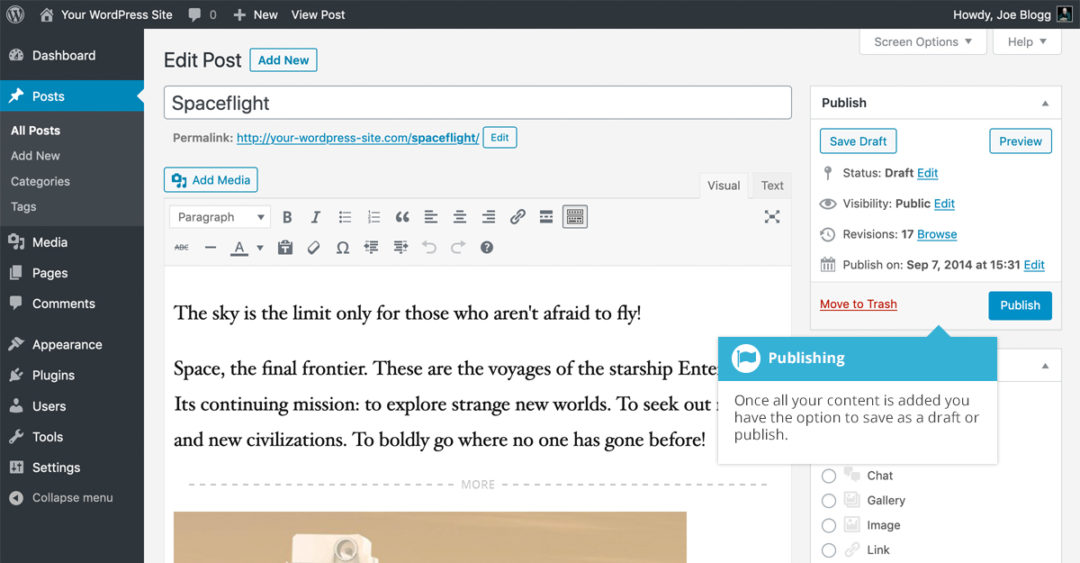
- Go to Posts » Add New and the WordPress post editor will be shown in front of you.
- You can see the box to enter the post title and the rest of the content will be written in the bigger box.
- Once you finish writing your article, publish it by clicking on the “Publish” button.
💡 Tip: To make this process easier and write SEO-friendly blog posts & pages, I strongly recommend installing Rank Math SEO plugin.
Remember, it’s essential to write content that matches Google search intent, which directly increases the blog’s organic traffic and then earnings.
Moreover, using keyword research tools like SEMrush or Ahrefs can help you to beat your competitors and rank higher on SERPs with less effort in a targeted time.